Agile Git branching strategies in 2023
After working on many projects, I’ve found that branching strategy is one of the most underestimated decisions in software development. It quietly shapes how teams collaborate, how quickly they deliver, and how reliably they release.
Git-flow is often the default choice. It is well-documented, widely known, and seems structured. But in practice, that structure can introduce friction rather than clarity.
Many teams eventually move toward simpler models like GitHub Flow or trunk-based development, especially when working with continuous integration and high-load systems.
In this article, I’ll walk through these approaches and explain, from experience, why simpler branching models often lead to more predictable and efficient development.

Why do we need git
The use of a distributed version control system like Git is often taken for granted. It is a standard tool in modern development, but its role goes deeper than simple version tracking.
Software is built collaboratively. Multiple engineers contribute to the same codebase, often working in parallel. The core challenge is not writing code, but integrating it. Git provides a structured way to manage this process, allowing independent work while maintaining the ability to merge changes into a single, consistent system.
This makes version control a foundational element of Continuous Integration (CI). CI is, at its core, about frequent and reliable integration of changes. Without version control, this process would be unmanageable.
For this reason, branching strategy is not just an organizational choice. It directly affects how effectively a team can integrate work, reduce conflicts, and move changes toward production.
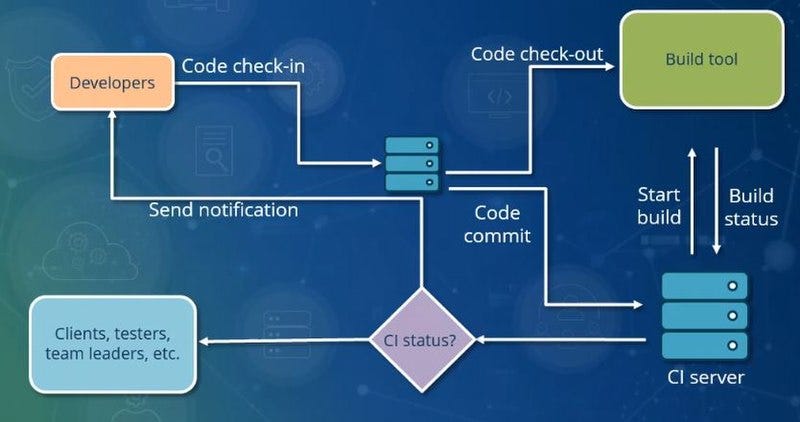
https://en.wikipedia.org/wiki/Continuous_integration
Continuous Integration is often paired with Continuous Delivery (CD), forming a unified approach to building and releasing software.
While CI focuses on integrating changes frequently, Continuous Delivery ensures that those changes are always in a releasable state. This is achieved through a pipeline, or value stream, where each change progresses through a sequence of validation stages.
In a typical web or service environment, these stages include development testing, QA, user acceptance testing (UAT), and performance validation, each executed in its corresponding environment.
A release candidate is not defined by time or branching, but by successfully passing through this pipeline. This shifts the focus from managing releases to continuously proving that the system is ready for release.

Example of CD pipeline
Git branching — Use cases
Git branching — use cases
A Continuous Delivery pipeline introduces a fundamental challenge: multiple versions of the product must coexist.
While one version is moving through testing and release approval stages, development does not stop. New features are implemented for future releases, while the current version may still require fixes, support, and stabilization.
Without a structured approach, this quickly leads to conflicts, instability, and loss of control over what is being delivered.
Git branches exist to manage this complexity. They provide a way to isolate work, support parallel development, and control the flow of changes between different stages of the delivery pipeline.
Given this, the question is not how to use branches, but how to use them effectively.
This article assumes familiarity with Git fundamentals such as commits, branches, merges, and diffs. The focus here is on how branching strategies can support real-world delivery processes.
Before going into a comparison of different branching strategies, let’s formalize first a little few requirements which are typically needed for a project.
UC 1: Individual Contribution
- UC 1.1 — Local copy
- UC 1.2 — Prototyping
Let’s start from the basics. While version control systems (VCS) and Continuous Integration (CI) are often framed as team-level tools, the foundation of development is still individual work.
Each developer works with a local copy of the repository, often referred to as a working copy. This local environment allows full control over the codebase, enabling modifications, experimentation, and debugging without affecting others.
This isolation is essential. It provides a safe space for prototyping and exploring ideas before they are integrated into the main codebase.
The ability to build, run, and debug the application locally is also a prerequisite for effective Continuous Integration. CI relies on the assumption that changes can be validated independently before being merged and verified at the system level.
For a more detailed explanation of the concept of a working copy, refer to the official Git documentation: https://git-scm.com/book/en/v2/Git-Basics-Getting-a-Git-Repository
UC 2: History
- UC 2.1 — Backup
- UC 2.2 — Rollback
- UC 2.3 — Difference
- UC 2.4 — git-blame
Working on a local copy provides flexibility, but it also introduces risk. Experiments, refactoring, or simple mistakes can easily break the working state. For this reason, maintaining a reliable history is essential.
Git provides this safety through its commit history. Every change is recorded, allowing developers to restore previous states, revert problematic changes, and compare different versions of the code.
This ability to navigate history is critical for troubleshooting. Whether comparing a local change with production, analyzing differences between releases, or identifying when a defect was introduced, history provides the necessary visibility.
In practice, this also supports Continuous Integration workflows. When a change breaks the build, it is often faster to revert or isolate the problematic commit, allowing the pipeline to recover and development to continue.
History is not only about restoring code, but also about understanding it. Tools like git blame make it possible to trace changes back to their authors, often providing context through commit messages and associated discussions. This helps explain why a particular decision was made and how the code evolved over time.
For more details:
- https://git-scm.com/book/en/v2/Git-Basics-Viewing-the-Commit-History
- https://git-scm.com/docs/git-blame
UC 3: Team Collaboration
- UC 3.1 — Continuous Integration
Software development is a collaborative effort built on individual contributions. Each engineer works in parallel, but those contributions must eventually be integrated into a single system. For this reason, it is worth emphasizing the importance of Continuous Integration (CI).
The challenges that come here, are while you building your code and someone doing something in parallel, some parallel versions will become incompatible, in most simple scenarios it could be solved through the git merge conflict resolution process, however, it will not address logical incompatibilities.
And for that reason, CI practice suggests to integrate changes often, like once a day or so.
There exists certain criticism about long-lived feature branches as something that should be avoided. Even if tested something quite well in a local copy(feature branch), it doesn’t mean that everything will work well after integration — so it is recommended to do continuous integration as often as possible.
In my experience with projects where code review is done, merging to CI branch once a day is not achievable, however, still feature branch should not live too long.
https://www.atlassian.com/git/tutorials/comparing-workflows/feature-branch-workflow
UC 4: Code Review, Quality Gates
- UC 4.1 — Review before integration
- UC 4.2 — Validation before merging to the mainline
In modern development, code review is a standard practice in most teams. Changes are typically reviewed before they are merged into the main branch.
Code review serves as a quality gate. It helps identify issues early, improves consistency, and ensures that changes align with the overall design and standards of the system.
In addition to review, automated validation such as testing is often required before integration. These checks help prevent breaking the mainline branch and ensure that the Continuous Integration process remains stable and reliable.
Together, code review and automated checks form a controlled entry point into the shared codebase, balancing development speed with system stability.
The code review process nowadays is required for most of the team and typically code review is required before anything is merged.
UC 5: Release candidates
- UC 5.1 — Developing new features
- UC 5.2 — Testing release candidates
The challenge that comes with the release candidate, is quite often teams can have 3 different versions of software: Something already running in production, while the team started working on a new functionality set, and the set of functionality is different from that is being tested for currently upcoming production release.
And the challenge here is that testing of release candidates can take a long time, meanwhile, the team should have the flexibility to contributed and develop new functionality in parallel, that most like will not be not included in the current upcoming release.
UC 6: Production maintenance
- UC 6.1 — Production hotfixes
Production issues typically happen suddenly and unexpectedly, while there is a release candidate in the last stage of testing which still can take a long time to test, and for such a situation business and management might require to deploy a hotfix before the release candidate, and there should be a shortcut to release and deploy hotfix without releasing entire release candidate.
UC 7: Alignment with Scrum/Agile
- UC 7.1 — Frequent internal releases every iteration
- UC 7.2 — Production release planning of multiple iterations
The iterative development using Scrum requires that every sprint team should deliver a well-tested functionality kind of internal release, however, it is not necessary that the team should do the production release — and from the branching strategy perspective it is actually required to make it flexible, so deployment/testing of iteration deliverable could be done in parallel to currently upcoming production release.
The efficient branching strategy should be flexible for businesses and management to decide how many iterations and functionalities to be completed before the system is released to production. And considering that each iteration will have well-tested deliverables, it should be possible to go into production anytime.
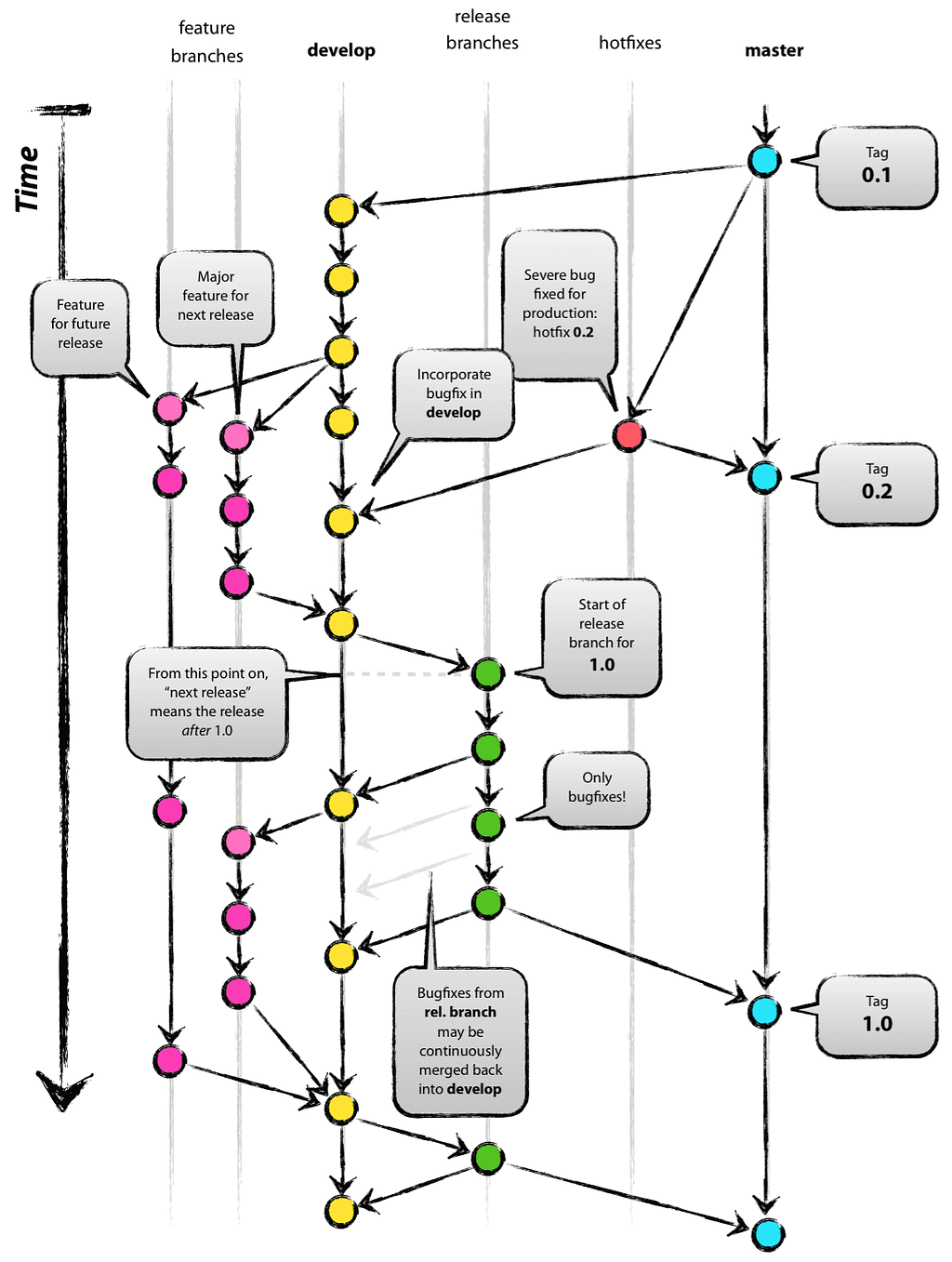
Git-flow branching strategy
Git-flow is a very know branching strategy it was 10 years on the market, and it is very flexible and can address all the use cases described above. However, despite its popularity, it has also been the subject of considerable criticism.
The initial idea was described by Vincent Driessen and also popularized by Atlassian.
- It is the original Vincent Driessen post: https://nvie.com/posts/a-successful-git-branching-model/
- Explanation of git-flow by Attlasian: https://www.atlassian.com/git/tutorials/comparing-workflows/gitflow-workflow
https://nvie.com/posts/a-successful-git-branching-model/
The main idea behind git-flow is to introduce a new develop branch that is used by the team mainly for CI to integrate their changes with new functionality, while stable versions released into production are kept in the master(main) branch. The flexibility of git-flow is done mainly through kind of cherry-picking usage of features and hotfix branches. It is not actually exactly git cherry-picking, because cherry-picking in git terminology is the copying of a commit from one branch to another, and real cherry-picking tends to lose the git history and complicates the git merge conflict resolution process. Here with git-flow, we actually have to merge our feature/hotfix branch so all the history will be preserved which is important for use case UC2.
Let’s go by uses case one-by-one, and see how it fits development demands.
UC 1: The typical development start from slicing a branch for feature development or hotfix. The main difference between development and hotfix — is that hotfix is done against the released production version (UC6), so the production tag version is used to slice a hotfix branch, while feature development is done again the CI branch (UC 5) and the feature branch is sliced from develop branch.
Let’s say we need to make a hotfix, first we need to create a hotfix branch from the production tag version:
git checkout main
git checkout -b hotfix_branch
It usually recommends that two developers shouldn’t check in their changes into the same hotfix/feature branch, so the branch is mainly used for individual development(UC1), until the moment it will be integrated with a mainline branch like develop or master(main) (UC 3).
UC 2, UC 3: The history is important, here since we sliced a branch, and the branch will inherit all the history of the original branch whether it is the master(main) or develop branch. Once the development of the hotfix/feature is done, it needs to be merged back into mainline branch like develop or master(main) branch.
- hotfix is merged into both branches: develop and master(main)
- feature merged only in develop branch
This is an example of command how to merge a hotfix branch:
git checkout main
git merge hotfix_branch
git checkout develop
git merge hotfix_branch
git branch -D hotfix_branch
As you can see, since we merged it back all the hotfix history will be shared with the master and develop branches (UC 2). Also once this operation is done the changes are coming through a continuous integration process with the team (UC 3)
UC 4 Since all individual development work is done either in the feature or hotfix branch, the team can push that branch through the quality process like code review, CI quality gates whatever.
Code review and merge approval typically take time for the reviewer to read the code and communicate. The owner of the feature branch actually can work in parallel at this moment on multiple things in multiple parallel feature branches.
UC 5, UC 6: because there is 3 different type of branches develop, master(main) and feature/hotfix team can work in parallel on multiple things:
- develop with feature branches — do necessary changes for the release candidate in order to prepare the production release
- master(main) with hotfix branch — do the production maintenance to release changes scoped to hotfix only
- feature branch — technically you can start working on a new feature branch that is not planned for the current upcoming release, just keep developing here without reintegrating back into develop branch. The careful reader may notice here that it is against the CI process best practice, however, criticism of git-flow will be later.
UC 7: Alignment with SDLC is very important here, and the fact that develop and master(main) branches are separated, the scrum team can do as many internal releases as needed and be ready for production release at any time from the develop branch.
Git-flow criticism
Git-flow is something known for the last decade and is still a very popular approach, and as you can see above it can address all the production needs, however, the question is why some organization with complex development process tends to move away from git-flow.
For example Vincent Driessen who initially invented git-flow, also recommends moving away to something more modern like GitHub-Flow: https://nvie.com/posts/a-successful-git-branching-model/.
Atlassian nowadays considers git-flow as a legacy branching model: https://www.atlassian.com/git/tutorials/comparing-workflows/gitflow-workflow and their suggestion to move to a trunk-based approach.
Martin Fowler, a well-known software engineer and author, highlights a key point of criticism around Git-flow, focusing on the problems associated with long-lived feature branches. These branches delay integration and disrupt the Continuous Integration process, increasing both the risk and the cost of merging changes later.
- https://martinfowler.com/articles/branching-patterns.html#Git-flow
- https://www.thoughtworks.com/radar/techniques/gitflow
- https://www.thoughtworks.com/radar/techniques/long-lived-branches-with-gitflow
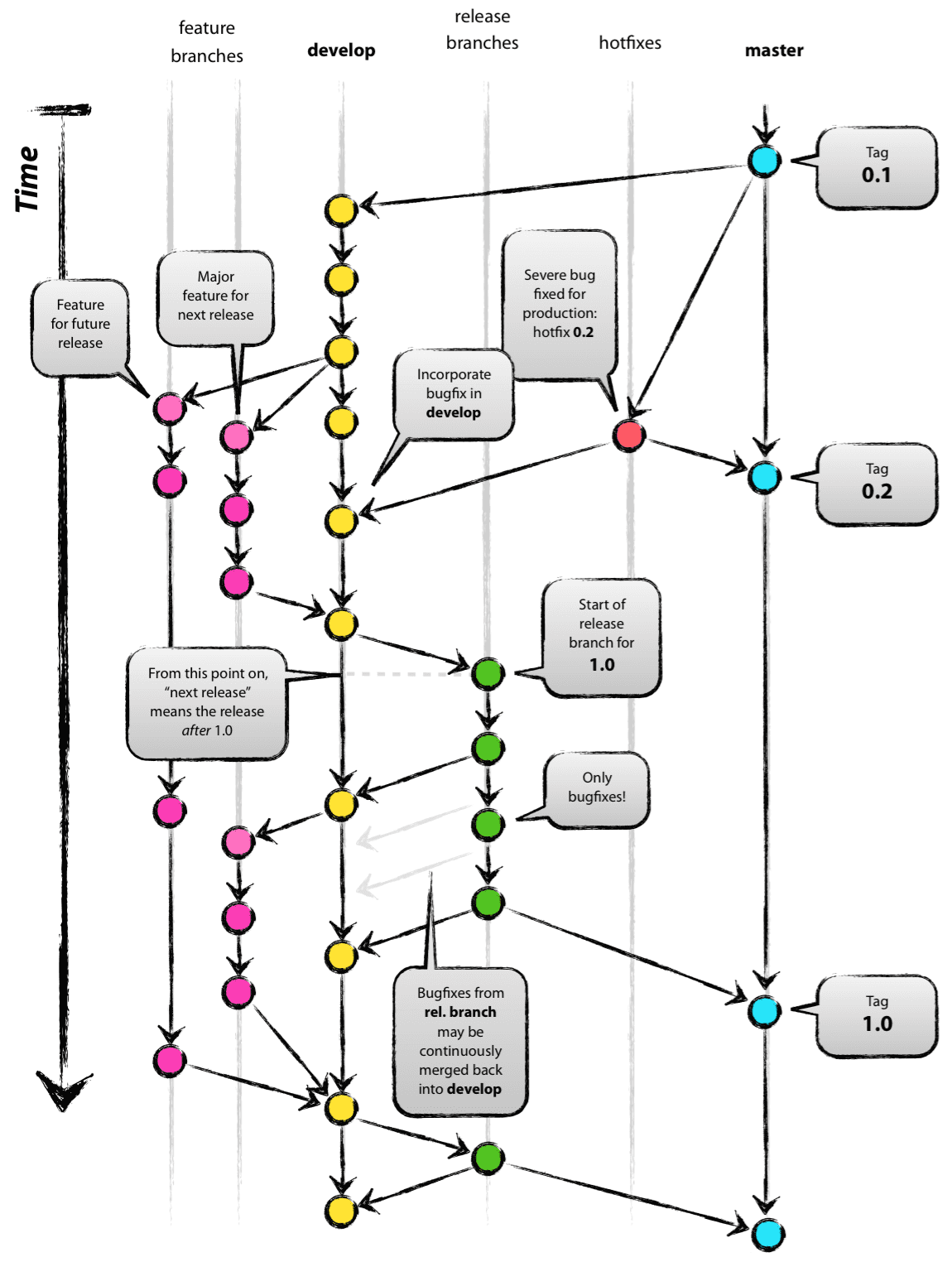
https://nvie.com/posts/a-successful-git-branching-model/
With git-flow, there is a certain fundamental issues, let’s go through them:
Develop and Master(main) branch divergence
One of the first issues visible in the Git-flow model is the divergence between the develop and main (master) branches.
In this setup, most development and testing occur on the develop branch, while the main branch is reserved for production-ready code. As a result, the exact state of the main branch is rarely validated in the same local development environment where changes are created and tested. This creates a gap in the Continuous Integration process, since the final integration step into main is not continuously verified in practice.
Because of this, code that works correctly on develop may still fail once merged into main. The assumption that stability transfers automatically between branches does not always hold, especially as divergence increases over time.
Another consequence is that the main branch effectively becomes a write-oriented branch. Developers push changes into it, but rarely integrate from it during regular development. The main branch is often only revisited when an issue occurs in production.
At that point, a hotfix branch is typically created from main. While fixes may later be merged back into develop, the process is not always straightforward. Git merge behavior depends on previous merge history and conflict resolutions, and does not guarantee that the full state of main is cleanly or completely reflected back into develop.
Over time, this leads to increasing divergence between develop, main, and hotfix branches. This divergence complicates future merges, introduces inconsistencies, and can negatively impact the reliability of further development.
Long-living feature branches
There are no particular git-flow guidelines regarding the length of the feature branches, however, git-flow encourages developers to do the work in feature branches, actually, if the team can do git-flow with short-living feature branches it is not really an issue, however since there are no strict guidelines, long-living feature branch happens quite often with git-flow.
Git history cumbersomeness
The fact is that linear history is much easier to navigate than history built of many relations between merge commits, and in many teams, I was working much time with a team where git squash commits for pull requests were quite often encouraged, and history much cleaner and easier to understand. With git-flow, it is not really possible to build linear history, since there are two independent branches are things are branch cherry-picking between them, which is obviously seen in the diagram above.
Speaking about git history complexity, and actually, if you take a look again diagram with git-flow, that history looks very logical, however, git history doesn’t work the way it is drawn in the picture, and the particular git commit doesn’t actually belong to the branch, it exists only in our imagination like that, git branch no more just a reference to git commit, and if you’ve made a feature branch and than made a commit to that branch, and merged that branch into any of mainline branch, git doesn’t keep this information which branch was used to push that commit at first place, sometimes it is hard to navigate through git history, and in reality, the picture above with some real git log viewer will look more like spaghetti of git merge commits, and such view above it is rather a representation of SVN branching model than a git one. I can assume that at the time when git and git-flow appeared people still worked a lot with SVN, and SVN branching still had a significant influence.
Use cases
Actually, as you can see it seems that git-flow is really covering all the use cases needed for modern development, however digging into details holistically we can see it has flaw with almost every detail. Let’s go one-by-one with use cases.
UC 1: You can do the development in your feature branch, however long-lived feature branches and that divergence between master(main) and develop branches, it is actually required a certain effort to reproduce the production code version on your computer and integrate it with develop branch.
UC 2: History is there, however, the history will be cumbersome and hard to navigate, and plenty of merge commits will make things even harder
UC 3: Continuous Integration for the master branch is actually not fully happening as expected due to divergence between the master(main) and develop branches.
Long-living feature branches might happen and delay CI.
UC 4: Merging the process of developing the branch into the (master)main is going to be complicated, and done reactively on issues that already happened in production.
Also merging of develop into the master and code review of that merge becomes complicated because at this point there is no single responsible person for develop branch since it is a collaborative branch and results from joint efforts.
In my experience, I was observing a situation when a strong senior engineer was struggling to merge develop branch altogether into a master, and the quality of that merge was really suffering at the end, enough said…
UC 5, UC 6: Worth stating it again here, develop and master(main) branches most likely to diverge, and even that fact that is possible to do the changes into different branches with git-flow approach, the process is not entirely reliable.
UC 7: It is mainly coming with long-lived feature branches, with short-lived feature branches it is not really an issue, however according to Agile/Scrum feature branches need to be merged and tested before the end of the iteration.
Git-flow alternatives
git-flow and its related complexity emerged due to the needs of the project teams, however, the main issue with git-flow is not the complexity, but rather it couldn’t handle certain situations reliably, and for that reason, other approaches exist.
Here are a couple of alternatives git branching strategies:
- GitHub-Flow
- Trunk based development approach
Speaking shortly about these two GitHub-Flow and Trunk-based development approaches. The GitHub-Flow is likely because of its simplicity, while Git Trunk-based is quite developed and can handle all the Use Cases like git-flow does, however, it is made in different comparing to git-flow and can overcome many git-flow issues described above.
Also, there is another practice called feature flag — it is not really a branching strategy, however greatly helps to maintain the use cases described above, and it is worth mentioning as it is very supportive in addition to the git branching strategy.
Also, I would recommend going through this article, since it has a lot of guidelines and different scenarios for different use cases: https://martinfowler.com/articles/branching-patterns.html
GitHub-Flow branching strategy
For some certain projects, an entire git-flow process with develop and master(main) branches and multiple releases can be just overcomplicated, essentially that you maintain an open-source product hosted somewhere on the git hub, and you don’t have the actual capacity to maintain something more than one release.
The main idea behind GitHub-Flow, it has only the master(main) branch, and any changes are done through a feature branch like git-flow, however, feature branches are merged into the master(main) branch directly, since there is no develop branch. GitHub-Flow is entirely supported by GitHub pull requests.
The fact that you need to maintain only the master(main) branch, your branching model is greatly simplified compared to git-flow, and the overall process is much more reliable however it comes with a cost, you can’t actually separate development for production hotfix and release candidate, and UC 5, UC 6 is not fully supported by GitHub-Flow.
However regarding all the other use cases like UC 1, UC 2, UC 3, UC 4, UC 5.1, UC 7- it handles much better than git-flow and doesn’t have a git-flow drawback.
My advice: If you working on multiple projects, if you can choose different git branching strategies for a different project, it is obviously beneficial to choose the branching strategy that works for a particular project the best way, and if you see that some of your projects don’t really require UC 5 and UC 6 — it will be much more reliable and save a lot of your time if you can just use GitHub-Flow for that project instead of git-flow.
Git Trunk based development with the branches
Git Trunk is a very developed git branching model, and there are many different patterns for the different situations you can find on the URL bellow, and it can cover all the use cases listed above.
https://trunkbaseddevelopment.com/
When I am hearing about trunk, it makes me nostalgic thinking about old good times when we used SVN with a trunk where all developers were committing their changes. Git is a more advanced technology than SVN, and once git come to the market with a powerful branching system, it really changed the way we do development and branching.
The most basic usage of Git Trunk approach is that you have only the master(main) branch and all the team members pushing directly to there. It might feel a little bit extreme, just push directly without any feature branch, code review, and some pre-CI process, however, I can assure you that a decade ago most of the teams were working like that, and created many great products. If you have a team where you trusting to each other like yourself, then why not do the same?
However, in this article, we going to cover Git Trunk-based development for more like enterprise development, where we want to address all the Use Cases above.
What I really love about the Git Trunk approach is that it is very flexible, you can start with very basic like the above, and based on your needs you can setup different levels of maturity of your process, while the approach is backward/forward compatible itself if you started with some very basic level, you always can improve your process to next level and if the process seems overcomplicated you can downgrade your approach.
UC 1, UC 2, UC 3 Individual contribution, History, and Team collaboration is already fully addressed with basic git trunk, and you don’t need any other branching rather than master(main) for this.
To get started you can easily clone the remote git repository into your working copy.
git clone git@github.com:amidukr/virtual-network-framework-js.git
https://git-scm.com/docs/git-clone
Once you are done with your changes, just commit to your local git clone, and merge with upstream remote by pulling and then push into remote.
git add .
git commit -m "Commit name"
git pull
git push
UC 4 Code review: Perhaps giving access to everyone for your master(main) branch seems too risky for you, so perhaps you want to introduce some code review process, and for that reason, you might want to introduce the feature branches to your project, and it might look like GitHub-Flow now.
Whether it is a trunk-based approach or git-flow you still can get into long-living feature branch issues, however, the main difference here is that the trunk-based approach explicitly guides you to do the short-living feature branches to encourage the typical trunk-based CI process.
To create a new feature branch from the latest master branch.
git checkout master
git pull
git checkout -b <branch>
https://git-scm.com/docs/git-checkout

https://trunkbaseddevelopment.com/short-lived-feature-branches/
Most of the tools like GitHub have a built-in feature for code review of feature branch before it being merged, so here you can learn more about GitHub pull requests.
Using just a git command line without any tooling, merging feature branch is just simple like that: pull/merge from master, and then push merged version back into master:
git pull origin master:<feature-branch>
git push origin <feature-branch>:master
UC 5, UC 6 Maintaining multiple versions: — in most simple scenarios you don’t need to maintain many versions, so no reason to introduce any complexity where it is not needed, however the thing that is required here in order to keep version history, every time you make a release either internally release candidate or to production you need to mark git commit with a version tag.
git tag 0.0.16
Later on, when you are in a situation where you need to make a hotfix to production or to release a candidate while your master branch is far ahead of the release candidate, with git you can easily slice a branch of your tagged commit.
To make a fix, actually, there are two approaches:
- We can fix a bug on a master(main) branch and then cherry-pick it into the release branch.
- Or we can fix it in the release branch and merge the release branch into the main.
Actually, the first approach is more recommended, because the trunk-based approach encourages maintaining the master(main) branch up-to-date and stable, to be sure that issue is actually fixed for the product and will never happen in the future. Once it is fixed in the master(main) branch, it can be cherry-picked into the release branch.
The second approach can be used when issues on the release branch are hard to reproduce from the master(main) branch.
The entire process with the feature branch will look like follow.
# Creating release branch if it does not exist yet
git checkout -b release-0.0.16 0.0.16

# Creating branch for hotfix
git checkout master
git pull
git checkout -b <hotfix-branch>

# Do the necessary fixes on the working copy
git commit -m "Commit message goes here"
git pull origin master:<hotfix-branch>

# Request team code review and push the change once approved
git push origin <hotfix-branch>:master # or use GitHub pull request to merge it back

# Cherry-pick change into release branch
git checkout release-0.0.16
git cherry-pick -m <master-parent-number> <master-merge-commit-sha>
git push origin release-0.0.16
https://git-scm.com/docs/git-cherry-pick
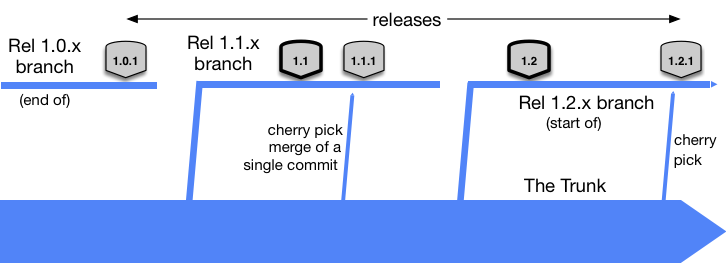
https://trunkbaseddevelopment.com/branch-for-release/
Even if there is a divergence appears between some of the release branch and the master(main) branch, unused previous release branches will be removed eventually, the main effort of trunk based approach to maintain master(main) branch as stable, so any issue in the past release shouldn’t be happening again and be fixed in master(main) at first place.
Quite often the release branches are not really needed, if you have a strong team, who made all necessary testing in a lower environment, and there is no production incident there is no reason to slice a release branch of the tag, and the team can just keep going with the master branch. Slicing the release branch is only needed in case of a production emergency.
UC 7 Alignment with Scrum: From the iteration release and production release — trunk based approach also fits well, since with release branches it still possible to do development and production support in parallel. The team can work with iteration as usual in master(main) branch, and it is up to management to decide when they want to go into production.
It could be a situation when QA can take a little bit longer on testing of release candidate version, the process is really like the above with production hotfix, in most simple cases the git tag is the only needed thing, however, if change/fix is required to release candidate version in QA/UAT, then the process is the same make sure master has necessary fix and cherry pick it into release candidate branch before releasing for testing.
Trunk-based versus Git-flow divergence: as you can see here with the trunk-based approach since every new release really starts from the git tag that exists on the master branch, there is no initial such a situation as divergence, and even if that divergence already happened between master and release branch, it will never be repeated again with subsequent releases, since release branch always sliced from tag on the master branch, and the process encouraging to fix the problem first in master branch.
With the git trunk approach literally every exact commit that is being deployed to the production/release candidate comes through CI the process and eventually developer was able to check out to his local computer and do the necessary testing and fixing before it is created the problem in production.
Also, you can see that the trunk-based approach has the same level of flexibility compared to git-flow, actually, it is possible to do the maintenance of multiple versions at once, and the trunk-based approach can support the same level of maturity with the application development process like the code-review, quality practices, versioning etc. However, it doesn’t have certain git-flow flaws.
Live world examples
Who uses trunk-based development — I think I have a very good example. Spring is a very know project in the Java community with a long history and many supported modules and releases versions— The spring community has an article describing its branching model, and they do not say explicitly that it is trunk-based development, however, the fact they keeping release branches and doing cherry-picking from main(master) branch into there it really looks like so:
Spring Boot seems to have a little bit more sophisticated branching policy compared to Spring Framework, however, the core part critical fixes are done in main(master) branch and then cherry-picked into release.
There is something non-canonical to trunk-based development in Spring Boot, they do -no-ff merges between release branches because, they need to support multiple release branches.
So technically it is not exactly trunk-based development and not git-flow for sure, however, it shares more similarities with the trunk-based approach. The fact that their release branches are long-living, can lead to a similar situation like git-flow, however, the release branch will be abandoned eventually and all its issues will go away eventually with that branch, taking advantage of trunk-based development.
Feature flags
The feature flag is not really a branching strategy and not related to git in general, however, it has great support to maintain differences and sometimes simplify branching and releasing.
A feature flag is just another setting to the application that enables/disables certain features, typically applications already have the tooling to support different configurations across different environments, for example, the database instance is quite often different for prod and non-prod environments. Production setup may have different configuration for performance tweaks. And feature flag is just another setting like that, it could be just a boolean flag, that can enable/disable application features in different environments.
Actually, in my practice, I’ve used Feature flags a lot in situations, when we needed to deliver some critical functionality, however, we couldn’t enable it because we were waiting for third-party dependency, we were able to well test it with third-party in the lower non-prod environment, however, our release cycle was running different scheduled. And with the use of the feature flag, I was able to deliver the functionality in production proactively, and once the third-party dependency became available in production, enabling functionality was as easy as changing the flag, and actually at this moment I was very confident that enabling the feature flag will not destroy something because to that moment everything was fully tested in lower environments with that flag enabled.
If you want to do the same thing with git-flow, perhaps in the situation above you would want to create the feature branch, and deploy the feature branch once 3rd party is available, however in this case hotfix is a shortcut that skipping many steps of the CD pipeline. With the feature flag, it is just another mainstream development which will go through all the CI/CD stages, the code will be available on every mainline branch so the team can test and integrate this feature in other environments.
However, it comes with a certain cost since application configuration becomes more complex and leads to dead code in the application logic for obsolete feature flags that need to be cleaned up eventually to clean up an application from dead-code.
If you want to learn more about feature flags, here are some readings:
- https://trunkbaseddevelopment.com/feature-flags/
- https://martinfowler.com/articles/feature-toggles.html